Nothing is lost
The new password is saved before any page sees it. If a change breaks off halfway, it stays in the login, waiting, where you can copy it, and the item's history keeps every earlier version.
Password fixer
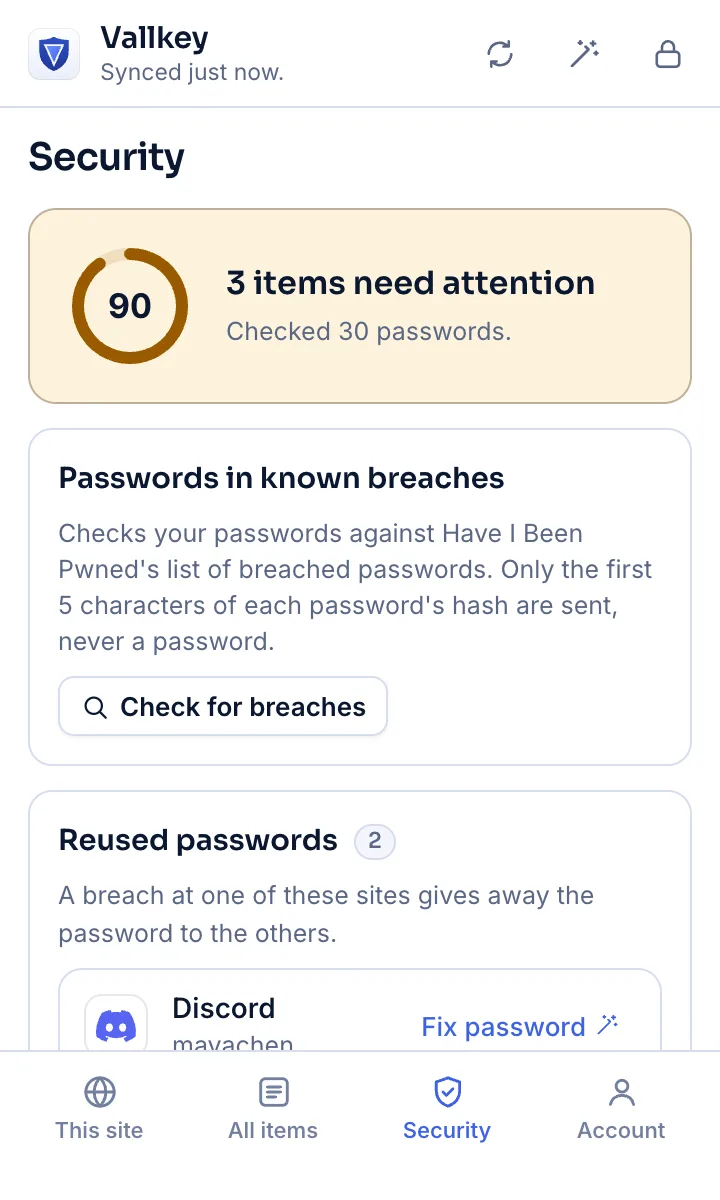
Security shows which passwords need changing. In your browser, Fix password opens the site's change page, fills the old password and a new one, and saves the new one once you say the site took it.
How it works
Passwords in known breaches, reused between sites, easy to guess, or sent without https.
Vallkey makes a new password that follows the site's rules and saves it in the login, marked as not confirmed yet. Then it opens the site's change page, fills the old password and the new one, and sends the form.
Vallkey asks whether to update the saved password. Update makes the new password the login's, and the old one goes to its password history.
The details
The new password is saved before any page sees it. If a change breaks off halfway, it stays in the login, waiting, where you can copy it, and the item's history keeps every earlier version.
The passwords go only into a page whose address the login matches: never another site, another site's frame, or a lookalike. And only in the tab Vallkey opened, for 15 minutes, until the form is sent.
A signed pack names where each site's change page is, drawn from Apple's public list. Elsewhere Vallkey opens the site's /.well-known/change-password address, which sites that support the standard send on to their own page.
Where the fields can't be told apart, Vallkey asks Chrome's built-in model, on your computer, which is which. It's given what the fields say, never what they hold, and nothing is sent anywhere.
The web vault and the desktop and phone apps list the same passwords, with a Change password link to each site's change page.
It changes one password at a time, with you confirming each: it's guided, not unattended. Pages that ask for a one-time code, or build their form late, may need you to finish by hand.
Availability
Finding the passwords that need changing, and the link to each site's change page, are on every plan. Having Vallkey change them for you is in Premium and Families.
Its own page for a missing address opens instead, and you find the change page from there. Most large sites support it.
Yes, in Chrome, Edge, Firefox, Safari and the browsers built on Chrome. The on-device model that reads unclear pages is Chrome's alone, from Chrome 138, on computers that can run it.
Vallkey opens soon. Join the waitlist to hear first.